> For the complete documentation index, see [llms.txt](https://docs.kernel.ai/llms.txt). Markdown versions of documentation pages are available by appending `.md` to page URLs; this page is available as [Markdown](https://docs.kernel.ai/platform/data-setup/cleaning-rules.md).

# Cleaning rules

Choose which accounts Kernel recommends associating, creating, deleting, or merging

Open **Data actions > Rules** to choose how Kernel handles duplicates, parent relationships, accounts missing from your write source, and accounts that may need deleting. These rules create recommendations for the [action queues](/platform/actioning.md).

Choose a tab, make your changes, and click **Save**. Saving rules does not run a CRM action. After changing the rules, [refresh the recommendations](#refresh-recommendations), then review the results in Associate accounts, Create accounts, Delete accounts, or Merge accounts.

[Open Rules in Kernel](https://app.kernel.ai/cleaning/cleaning-rules)

## Refresh recommendations

When a saved rule change makes the recommendations out of date, the activity toolbar shows **Cleaning results are stale**. Use that notice to refresh them:

1. Click **Show activity toolbar** at the top of the app, or press **Cmd+.** on Mac or **Ctrl+.** on Windows.
2. Click the activity indicator to open the list.
3. Under **Cleaning results are stale**, click **Rerun cleaning action** and confirm with **Rerun cleaning action**.
4. Follow progress in the activity list. When it finishes, review the updated action queues.

The rerun refreshes CRM data and recalculates the recommendations. It does not execute the recommended associations, creations, deletions, or merges.

## Duplicates

Choose how Kernel should treat each type of duplicate.

| Setting          | What it means                                                             | Choices                                                                                         |
| ---------------- | ------------------------------------------------------------------------- | ----------------------------------------------------------------------------------------------- |
| **Regional**     | Country-specific records for the same legal company.                      | Keep separate records and associate them as subsidiaries, or treat them as duplicates to merge. |
| **Location**     | A branch or establishment and its parent company.                         | Treat them as duplicates to merge, or ignore this duplicate type.                               |
| **Trading name** | A legal entity and a trading-name record for the same company.            | Treat them as duplicates to merge, or ignore this duplicate type.                               |
| **Website**      | Records identified as website duplicates use the same stored website URL. | Treat them as duplicates to merge, or ignore this duplicate type.                               |

For example, **Regional** lets you keep Acme France and Acme Germany as separate accounts under Acme, instead of merging the records. The Website setting controls records already identified as website duplicates; choosing it does not make every pair of accounts with a shared domain eligible to merge.

<figure><img src="https://1215786129-files.gitbook.io/~/files/v0/b/gitbook-x-prod.appspot.com/o/spaces%2FvRYB7XIKCnmUi9oCEQGV%2Fuploads%2Fgit-blob-0b8847739e2bd63dbfece7b70904d1365fff420d%2Fapp-rules-duplicates.png?alt=media" alt="Rules showing action choices for duplicate records and absorbed companies"><figcaption><p>Choose how Kernel handles duplicate records and absorbed companies.</p></figcaption></figure>

### Absorbed companies

**Absorbed** is a special case for an acquired company that no longer operates independently. It appears on the **Duplicates** tab. Choose whether Kernel should recommend associating it with its parent, merging it, or deleting it.

### Deliberate duplicate rules

Use **Deliberate duplicate rules** when similar records need different treatment. For example, your CRM may keep separate billing accounts for one company.

1. Expand **Deliberate duplicate rules** and click **Add rule**.
2. Choose a CRM field, a comparison, and a value where needed.
3. With more than one rule, choose **Match any rules** or **Match all rules**.
4. Choose both **Action if conditions match** and **Action if conditions do not match**.

The two outcomes can be **Merge**, **Associate**, or **None (Deliberate Duplicate)**. None keeps the records separate. The matching and non-matching outcomes must be different.

| Comparison                  | How it matches                                                                                   |
| --------------------------- | ------------------------------------------------------------------------------------------------ |
| **is null**                 | The field has no stored value.                                                                   |
| **is not null**             | The field has a stored value.                                                                    |
| **equals** / **not equals** | Compare with the value you enter. Text comparisons use the exact text, including capitalisation. |
| **contains**                | The text includes the value you enter, regardless of capitalisation.                             |
| **matches within group**    | Another account in the duplicate group has the same non-empty value.                             |

When you use **Match all rules** with several **matches within group** conditions, the same other account must match every field. For example, matching both billing country and account type requires another record with both values, rather than one record matching the country and a different record matching the type.

## Related objects

Related objects are records connected to an account, such as contacts and opportunities. These settings apply when you delete an account or merge a duplicate into a primary account.

**Backup objects relationships** chooses which related object types Kernel saves with the action's backup. Select the objects you want to include. Backups use the records and fields the Salesforce connection can read.

**Associated objects** chooses whether Kernel deletes related records before removing their account.

| Choice                              | What happens                                                                                                                                          |
| ----------------------------------- | ----------------------------------------------------------------------------------------------------------------------------------------------------- |
| **Don't delete associated objects** | Kernel does not run a separate deletion of the related records. Salesforce handles them as part of its account delete or merge.                       |
| **Delete backup objects only**      | Kernel backs up and deletes related records from the object types selected above before deleting the account or merging it away.                      |
| **Delete all referencing objects**  | Kernel finds related object types that Salesforce allows it to read and delete, backs up their records, and deletes them before removing the account. |

Records deleted by either deletion option are removed rather than moved to the primary account during a merge. Choosing backup objects on its own does not delete them.

<figure><img src="https://1215786129-files.gitbook.io/~/files/v0/b/gitbook-x-prod.appspot.com/o/spaces%2FvRYB7XIKCnmUi9oCEQGV%2Fuploads%2Fgit-blob-1a2753c57f3ab3888b5bac4a45d4b15e4f8ba2d8%2Fapp-rules-related-objects.png?alt=media" alt="Related objects settings with a backup object selector and three choices for deleting associated records"><figcaption><p>Choose backup coverage separately from whether related records should be deleted.</p></figcaption></figure>

## Associations

Each **Skip parent suggestions when** switch removes a type of recommendation from the [Associate accounts](/platform/actioning/associate.md) queue.

| Setting                                      | When Kernel skips the suggestion                                                                                                                  |
| -------------------------------------------- | ------------------------------------------------------------------------------------------------------------------------------------------------- |
| **Parent is an existing holding company**    | The suggested parent is a holding company already in your CRM.                                                                                    |
| **New parent would be a holding company**    | The suggestion would create a holding company as a new parent.                                                                                    |
| **Parent shares the child account's domain** | The suggestion would create a new parent with the same website domain as the child. For example, `acme.com` and `www.acme.com/uk` share a domain. |
| **Parent has no website**                    | The suggestion would create a new parent that has no website.                                                                                     |

Kernel also skips parent suggestions when the parent's identity is undetermined or the parent is out of business.

**Allow associating safeguarded accounts** controls whether protected accounts can be included in association actions. Turn it off to exclude them; turn it on to allow them.

<figure><img src="https://1215786129-files.gitbook.io/~/files/v0/b/gitbook-x-prod.appspot.com/o/spaces%2FvRYB7XIKCnmUi9oCEQGV%2Fuploads%2Fgit-blob-63976242ce6cb70fc6738fffcfb67a03af7a0909%2Fapp-rules-associations.png?alt=media" alt="Association rules showing the four parent suggestion switches and the safeguarded accounts control"><figcaption><p>Choose which parent suggestions to skip.</p></figcaption></figure>

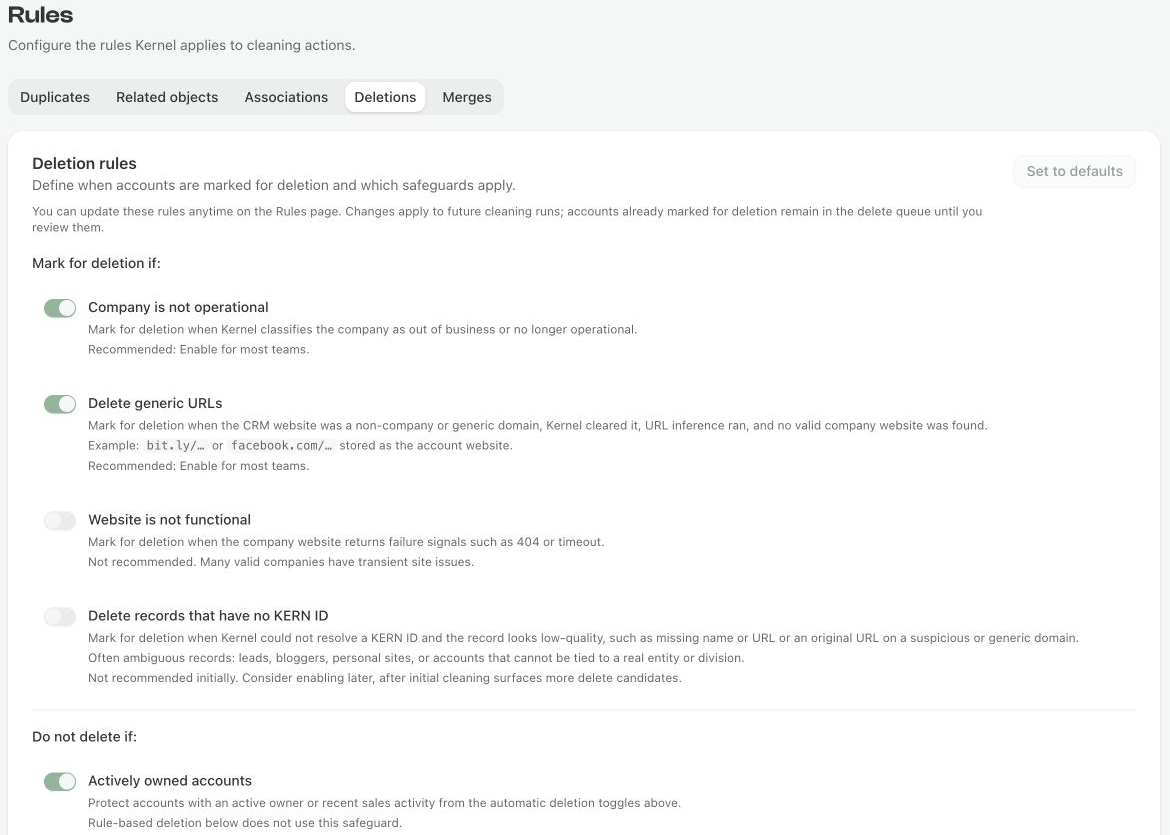
## Deletions

The switches under **Mark for deletion if** identify accounts for the [Delete accounts](/platform/actioning/delete.md) queue.

| Setting                                 | What it looks for                                                                                                                                       |
| --------------------------------------- | ------------------------------------------------------------------------------------------------------------------------------------------------------- |
| **Company is not operational**          | Kernel classifies the company as out of business.                                                                                                       |
| **Delete generic URLs**                 | Kernel removed a generic or non-company website, tried to find a replacement, and found no valid company website.                                       |
| **Website is not functional**           | The company's website is marked as not working, for example after a 404 or timeout.                                                                     |
| **Delete records that have no KERN ID** | Kernel could not identify the company, and the record is missing a name or original website, or its original website is a suspicious or generic domain. |

**Actively owned accounts**, under **Do not delete if**, protects accounts classified as actively owned from those four switches. [User types](/platform/data-setup/active-users.md) explains how Kernel classifies owners.

**Set to defaults** turns on Company is not operational, Delete generic URLs, and Actively owned accounts. It turns off Website is not functional and Delete records that have no KERN ID. It leaves your custom rulesets and safeguarded-account setting unchanged. Click **Save** to keep the change.

<figure><img src="https://1215786129-files.gitbook.io/~/files/v0/b/gitbook-x-prod.appspot.com/o/spaces%2FvRYB7XIKCnmUi9oCEQGV%2Fuploads%2Fgit-blob-b72e0adaa2ef2c0c913baa6b90d9407830f3c300%2Fapp-rules-deletions.png?alt=media" alt="Deletion rules showing the built-in criteria and active owner protection"><figcaption><p>Built-in deletion criteria and active owner protection.</p></figcaption></figure>

### Rule-based deletion

Use rulesets for your own deletion criteria, such as a CRM field that marks test accounts.

1. Click **Add ruleset** and give it a name.
2. Add a field, comparison, and value for each condition.
3. Choose **Match all** or **Match any** for the conditions inside the ruleset.
4. If you have several rulesets, choose **Match any ruleset** or **Match all rulesets**.
5. Use a ruleset's switch to enable or disable it, then click **Save**.

A matching ruleset marks an account for deletion even when none of the built-in criteria match. It also takes precedence over **Actively owned accounts**. Disabled rulesets are ignored.

### Safeguarded accounts

**Allow deleting safeguarded accounts** is separate from active owner protection. With it off, safeguarded accounts are excluded from delete actions. With it on, delete actions can include them. This applies to both built-in criteria and custom rulesets.

Changing deletion rules does not immediately remove recommendations already waiting in the queue. [Refresh the recommendations](#refresh-recommendations) to use the new rules, or reject a recommendation you do not want to run.

## Merges

**Allow merging safeguarded accounts** controls whether a safeguarded duplicate can be merged away. With it off, Kernel keeps that duplicate separate. With it on, the duplicate can be merged into the primary.

A safeguarded account can still be the primary that survives the merge. Its fields can receive updates under your survivorship rules. This switch protects duplicates from removal; it does not freeze the primary's field values.

Under **Primary account**, turn on **Use custom rules** to choose the surviving account using ordered prefer, exclude, or sort rules. See [Choosing the primary record](https://docs.kernel.ai/platform/actioning/merge#choosing-the-primary-record) for setup instructions, examples, and fallback behavior. Click **Save**, then refresh the recommendations before reviewing the new primary selections.

Use [Duplicates](#duplicates) to decide which kinds of accounts should merge. Use [Survivorship configuration](/platform/actioning/merge.md#how-field-values-are-merged) on the Merge accounts page to decide which field values the primary account keeps.

[Risk management](/platform/data-setup/configuration.md) explains how to set up the safeguards used for associations, deletions, and merges.

## Creations

On the **Creations** tab, turn on **Create accounts that are missing from your write source** to let Kernel recommend eligible accounts for [Create accounts](/platform/actioning/create.md). This setting is **off by default**. With it off, Kernel does not recommend creating those missing accounts.

Click **Save**, then [refresh the recommendations](#refresh-recommendations). Saving the rule and refreshing recommendations do not create accounts in your write source. Review and confirm each recommendation, or a selection of recommendations, in **Create accounts**.

Create recommendations also require a supported write source and saved **New accounts** field mappings. Kernel checks duplicates and parent relationships before recommending a creation. Missing parents with child accounts can be created through [Associate accounts](/platform/actioning/associate.md), subject to your association rules. See [How duplicates and missing parents are handled](/platform/actioning/create.md#how-duplicates-and-missing-parents-are-handled) for details.